


Download NokiaFREE Unlock Codes Calculator – unlock codes, unlock phone, unlock mobile, unlock Nokia, unlock Samsung, unlock SIM card, unlock mobile phone, unlock phone for free
Overview
The NokiaFREE Unlock Codes Calculator is a specialized utility designed to assist users in unlocking their mobile devices by generating unlock codes for a wide variety of phone models. This tool serves as a direct alternative to contacting mobile service providers or engaging third-party unlocking services, which often involve fees and lengthy processes. Its primary purpose is to empower users with the ability to use any SIM card in their device, enhancing flexibility for travelers, multi-carrier users, and those seeking greater control over their hardware.
Target users include individuals with older or legacy mobile phones, particularly those from brands such as Nokia, Samsung, Siemens, Maxon, NEC, Sony, Panasonic, Vitel, AEG/Telital, and Alcatel. These devices often come locked to specific networks, limiting their usability. The calculator provides a straightforward path to unlock such devices without incurring costs, making it a valuable tool in the mobile utility ecosystem.
Although the developer, NokiaFREE, is not further detailed in the provided information, the tool's focus on compatibility and ease of use suggests a targeted approach to solving a niche but persistent problem. Real-world use cases include international travelers who need local SIM cards, users upgrading carriers, and individuals repurposing older devices for secondary use. The app’s ability to retrieve unlock codes via internet-based databases adds to its relevance in a connected world.
Despite its specific function, the tool fills a critical gap in the mobile support landscape by offering a free, accessible solution for a task that is otherwise costly or complex.
Key Features & Functionality
- Extensive Device Compatibility – Supports a broad range of mobile models from major brands including Nokia, Samsung, Siemens, Maxon, NEC, Sony, Panasonic, Vitel, AEG/Telital, and Alcatel. This wide coverage makes it suitable for users with legacy or less common devices.
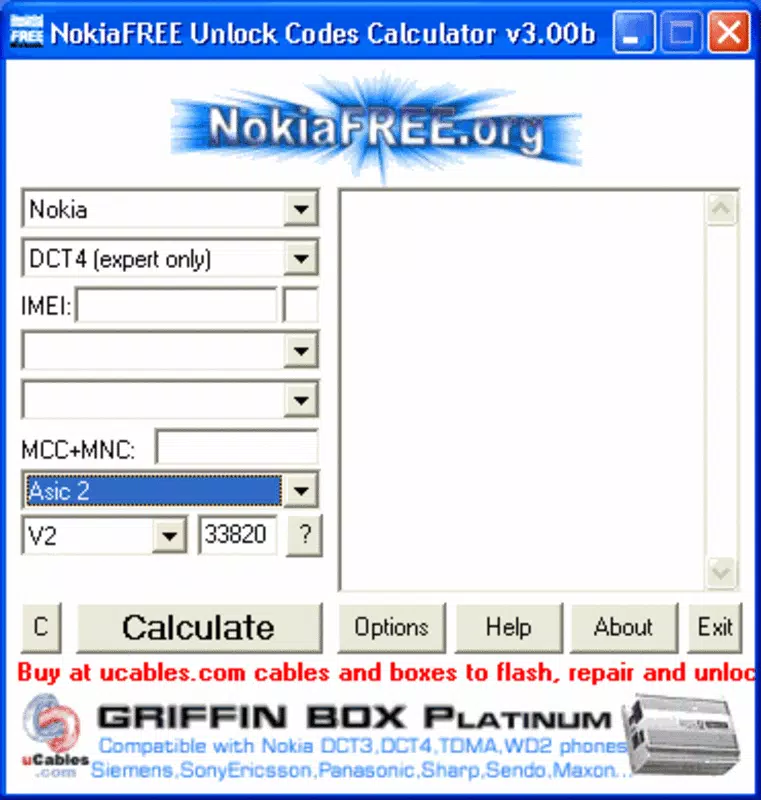
- Simple Input Process – Users are required to enter only three key details: the phone’s model, country of origin, and IMEI number. This minimal input reduces user error and streamlines the unlocking workflow.
- Internet-Dependent Code Retrieval – The software connects to online databases to search for the correct unlock code. This ensures access to the most current and accurate information, adapting to changes in carrier policies and device firmware.
- Cost-Free Unlocking Solution – Unlike carrier or third-party services, this tool provides unlock codes at no cost, offering a financially accessible alternative for users on a budget.
- Enhanced Device Flexibility – Once unlocked, users can use any SIM card across different carriers and regions, improving usability for travel, dual-SIM setups, or switching providers without buying new hardware.
For example, a user traveling from the U.S. to Europe could use the tool to unlock their Nokia device, then insert a local SIM card to avoid roaming charges. Similarly, a person purchasing a second-hand Samsung phone from a different country can unlock it quickly without contacting the original carrier.
Interface, UX & Performance
The interface of the NokiaFREE Unlock Codes Calculator is designed with simplicity and functionality in mind. It features a clean layout with clearly labeled input fields for model, country, and IMEI, minimizing user confusion. Navigation is linear and intuitive—users enter data, initiate the search, and receive results without unnecessary steps.
Visual style is minimalistic, focusing on usability rather than graphical flair. The absence of cluttered menus or excessive animations enhances the perception of reliability and speed. The tool does not include complex dashboards or settings, which aligns with its single-purpose function.
Although the developer did not list formal performance metrics, the lightweight nature of the application (1.3 MB) suggests it runs efficiently on standard Windows systems. Responsiveness is expected to be high, given the minimal processing required—mainly data input and network communication. Stability is likely consistent, as the tool does not rely on complex local computations.
Performance on older or low-spec systems may vary slightly, but the small file size and straightforward workflow indicate broad compatibility. The tool’s reliance on an internet connection means that speed and reliability depend on the user’s network, but the core application remains lightweight and responsive.
Platform Compatibility & Technical Requirements
The NokiaFREE Unlock Codes Calculator is designed for the Windows operating system. It is available in version 2.0, with a file size of 1.3 MB, making it highly accessible for users with limited storage. The developer did not specify minimum OS requirements, so compatibility with Windows 7 and later versions is assumed based on typical deployment patterns for such tools.
Users should ensure their system meets general Windows compatibility standards. No additional software or drivers are required for installation or operation. The application is standalone, meaning it does not need to be installed via a package manager or app store.
Although the developer did not provide information on support for other platforms such as macOS or Linux, the current release is exclusively for Windows. This limits accessibility for users on alternative operating systems. Additionally, the absence of mobile versions means smartphone users cannot access the tool directly.
Pros and Cons
Pros
- Free to download and use, eliminating cost barriers for unlocking.
- Supports a wide variety of mobile brands and models, increasing its utility.
- Simple input process with minimal user effort required.
- Relies on real-time internet databases for up-to-date unlock codes.
- Lightweight application (1.3 MB) with minimal system impact.
Cons
- Only available for Windows, limiting access for macOS and Linux users.
- Requires an active internet connection to function.
- Developer did not provide detailed technical specifications or system requirements.
- No mobile version available for smartphones or tablets.
- Success depends on database availability for specific models and regions.
FAQ
Is the NokiaFREE Unlock Codes Calculator safe to use?
The tool is designed to retrieve unlock codes via public databases. As long as users download it from trusted sources, it poses no inherent security risk. However, caution is advised when downloading software from third-party sites.
Do I need an internet connection to use the app?
Yes, an active internet connection is required. The application retrieves unlock codes from online databases, making connectivity essential for functionality.
Can I use this tool on my smartphone?
No, the current version is only compatible with Windows. There is no mobile version available for Android or iOS devices.
What information do I need to provide to unlock my phone?
You must enter the phone’s model number, country of origin, and IMEI number. These details help the tool locate the correct unlock code.
Is the unlock code guaranteed to work?
While the tool provides codes based on verified databases, success depends on carrier policies and device compatibility. Not all models may be supported, and results may vary.
Final Thoughts
The NokiaFREE Unlock Codes Calculator stands out as a focused, efficient tool for users seeking to unlock their mobile devices without financial or procedural hurdles. Its ability to support a broad range of models, combined with a simple interface and zero cost, makes it a compelling choice for anyone managing legacy or locked phones. While its Windows-only availability and internet dependency are limitations, the benefits outweigh these constraints for the target audience.
Travelers, second-hand device buyers, and users looking to maximize their phone’s flexibility will find this tool indispensable. It delivers real value by restoring full control over device usage, aligning with modern demands for portability and choice.
Download NokiaFREE Unlock Codes Calculator now


